Halloween Mode for Your Mac: A Local Vision Model Watches the Door
2026-11-03
English · 中文版
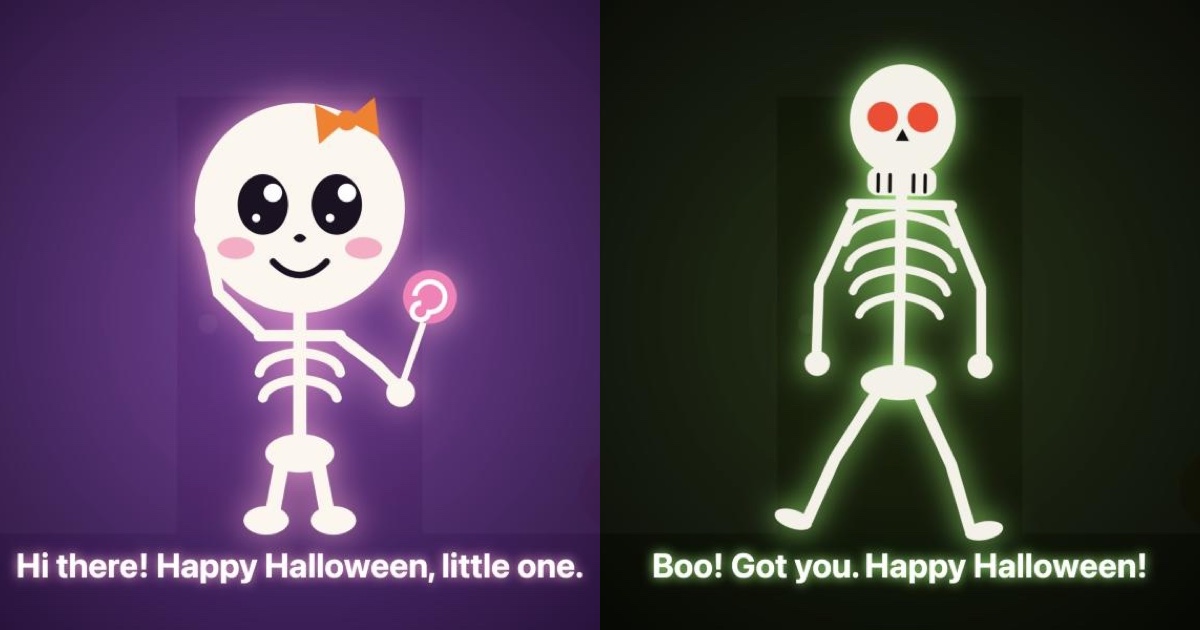
Point your Mac's camera at the door. When someone walks in, a skeleton jumps out on screen and the Mac reads a greeting aloud. Children and pets get a cute skeleton that hops and waves a lollipop. Grown-ups get a scary one that lunges at the screen.
Nothing goes to the cloud. A vision model running on the Mac decides who just walked in. A small gate in front of it makes sure the model only looks when the picture changes.
An empty room, someone walks in, and a few seconds later the scary skeleton lunges. This is a screen recording of halloween 0.1.0 and Tempo9 1.3.0, both installed from Homebrew, on an M5 Pro. The sound is the Mac's speakers picked up by its own microphone.
Try it
brew install thinkspread/tap/tempo9
brew install thinkspread/tap/halloween
halloween
The first run downloads Qwen3.5-9B (Q4_K_S) and its Core ML vision encoder, about 6.4 GB. Your browser then opens http://127.0.0.1:1031. Press 🎃 Start and allow the camera. There is nothing to configure.
| When the camera sees… | It says… | Skeleton |
|---|---|---|
| a child in a Halloween costume | Trick or treat! Great costume. Take two candies. | cute |
| a child | Hi there! Happy Halloween, little one. | cute |
| an adult in a costume | Nice costume... but I am scarier. Happy Halloween! | scary |
| an adult | Boo! Got you. Happy Halloween! | scary |
| a dog or a cat | A furry visitor. No candy for you. | cute |
Each visitor gets one scare. Step out of view and walk back in for another. The page follows your browser's language, English or Chinese. A switch in the corner changes it before you press Start, then hides so it stays out of your recording.
The source is at thinkspread/halloween.
Two programs, one machine
halloween does no inference itself. Tempo9 runs the vision encoder and the language model and serves them on 127.0.0.1:11435. halloween checks that a Tempo9 with vision is running, and starts one if not. It then serves the page on its own port and forwards exactly three calls to Tempo9: list the model, encode a frame, ask a question.
Why not serve the page from Tempo9 directly? A page on another port is another origin, and Tempo9 deliberately sends no CORS headers, so no other website open in your browser can read its answers. Forwarding through halloween keeps it that way.
The trick: don't ask about every frame
On our M5 Pro, asking the model one question about one frame takes 1.6–2.2 seconds. Asking about every frame of a camera feed would keep the GPU busy all night. So each frame goes through a cheaper filter first:
- Pixel check. Once a second, the page compares a 32×18 thumbnail with the last frame it measured. If it is unchanged, the page stops there.
- Vision encoder only. A changed frame goes to Tempo9's
POST /v1/vision/frame, which runs only the encoder and returns vectors. On the GPU this takes about 0.23 s for a 640-pixel frame (median of 20). - The model, rarely. Only when the picture has moved far enough does the model see it, with one question: which of these five is in the frame, if any?
We also tried running the gate's encoder on the Neural Engine. The same frames took 2.1 s there against 0.23 s on the GPU, so the gate stays on the GPU. The two produce matching vectors (cosine 0.9999 for the same frame).
Measure the region that changed, not the whole frame
Our first gate compared one vector for the whole frame. That vector averages the encoder's output over every patch, so a small change gets diluted by everything around it. With the centre 10 % of a camera frame replaced, the whole-frame distance moved only 0.009. With 30 % replaced, it moved 0.023. Both are under the 0.025 trigger we had taken from our earlier camera measurements. A visitor filling less than a third of the picture would never have woken the model.
The encoder now also returns one vector for each cell of a 4×3 grid, and the gate takes the cell that moved most. The trigger now adapts to the camera's own noise: it fires at 3.5× a running average of the quiet frame-to-frame distance, clamped to 0.030–0.060. Measured on Qwen3.5-9B's encoder as the most-changed region:
| Change | Distance |
|---|---|
| sensor noise | 0.013–0.023 |
| 4 % brighter exposure | 0.007 |
| a patch covering 5 % of the frame | 0.076–0.096 |
| a patch covering 10 % | 0.11–0.12 |
What our first real-camera run taught us
Nothing happened. In our first real-camera test, the person who pressed Start was sitting in front of the laptop. The first look recorded "4. an adult" and, by design, did not scare whoever had just pressed the button. A rule only fires when it becomes the answer. With the same person still in view, the answer never changed, and the skeleton never came. Now the first look acts like any other: whoever is in view at Start gets the first scare.
The next visitor got nothing. To catch people quickly, Halloween mode asks the model at the very first sign of motion. That look can land while someone is still halfway out of the frame, so the answer is still "an adult". In one synthetic run, the rest of that exit moved the picture by 0.0192: too little to trigger another look, too much to call the scene unchanged. The empty doorway was never checked, so the next visitor was "the same answer" and got no skeleton.
Two changes fixed it. When the picture comes to rest somewhere the model hasn't seen, the page asks once more. While someone is in view, the encoder also runs at least every 2 s instead of every 10 s. In the same synthetic scene (canvas camera, real encoder, and a stand-in model that answers by what is drawn):
| How the visitor leaves | Before: next visitor scared | After: next visitor scared |
|---|---|---|
| walks straight out | 1/1, empty doorway noticed about 6 s later | 1/1, noticed 1.7 s later |
| stops at the edge, then slips out | 0/1, empty doorway never noticed | 2/2, noticed 1.4–1.5 s later |
With both fixes and the region gate, a person walking in front of a real camera brought the skeleton up: that is the clip at the top. It is one run, not a measurement of accuracy. Recognising costumes, children and pets is the model's judgement, and it will sometimes be wrong.
Test setup: M5 Pro MacBook Pro (24 GB), Tempo9 1.3.0, Qwen3.5-9B Q4_K_S, with the matching Core ML vision encoder on the GPU. Greedy decoding, thinking off.
Local by design
The page may only connect to the server that served it (Content-Security-Policy: connect-src 'self'). That server is halloween on 127.0.0.1, and it forwards three calls to Tempo9 on 127.0.0.1 and nothing else. The skeletons are drawn in the page and the sounds are synthesised. The voices are the Mac's own. The network is used once, to download the model and the encoder.
What's next
This year, we are a little late. Next year, your Mac can watch the door for you.
The same gate is in Tempo9 1.3.0's built-in page, without the costumes. Run tempo9 --hf unsloth/Qwen3.5-9B-GGUF:Q4_K_S --tower auto and open http://127.0.0.1:11435. You can watch a camera, a screen or a video file with rules you write yourself, such as "the build has finished" or "someone is at the door".